
 Find a Projector
 Award Winning
 New Projectors
 Projector Brands
 Screen Brands
 Projector Lenses


 Find a Projector


 Subscribe
Editor's Choice Award
Our Editor's Choice award goes to products that dramatically exceed expectations for performance, value, or cutting-edge design.


- Triple laser light engine
- 4K UHD resolution
- Dolby Vision and HDR10
- Suitable for bright rooms
- Immersive surround sound when paired with Anker’s WI-FI satellite speakers (bundle available)
- 3D compatible
- Dark scenes are a mixed bag, with some being difficult to see, and others clear
- Auto screen fit deactivated between Blu-ray disk switches, but recalibrated with next
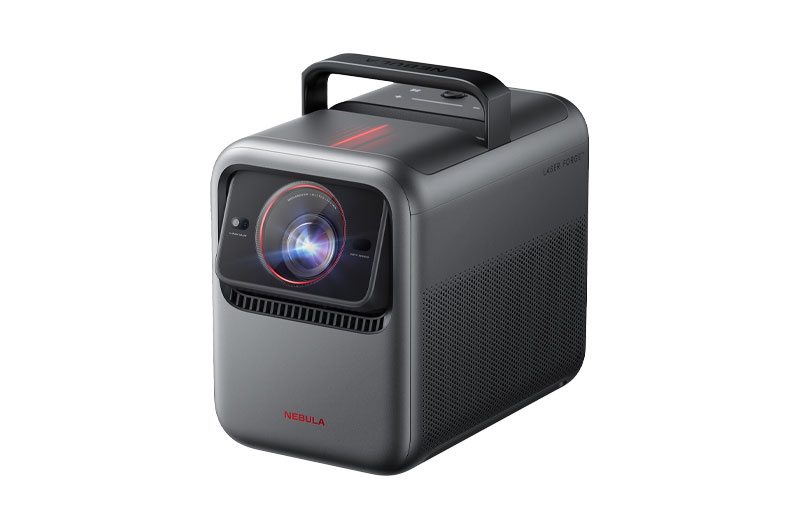
The Anker Nebula X1 offers the best of both worlds, with home theater performance and portability. Combined with optional Bluetooth satellite speakers, the X1 is a portable home theater, not just a portable projector, making it a standout against its competition. It offers an immersive 4K with Dolby Vision experience, low input lag, Google TV, and auto features that make setup a breeze. The X1 is a high-end projector suitable for those who want the home theater experience in a portable package.
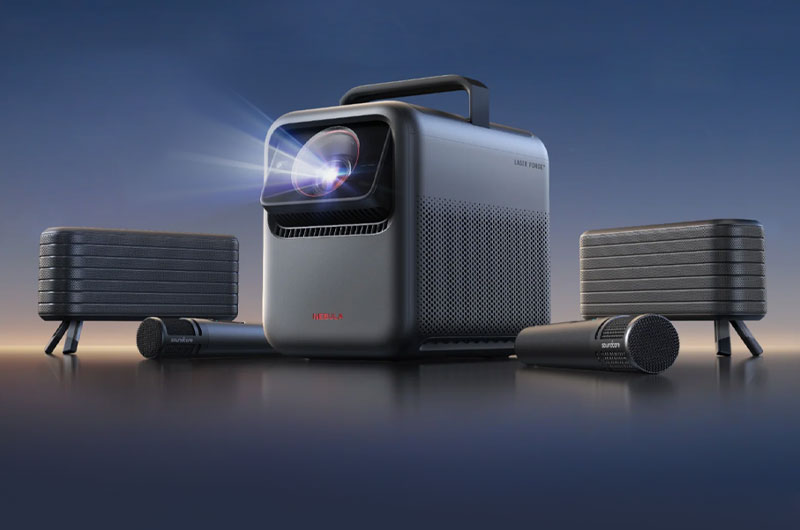
The Anker Nebula X1 makes a strong debut as a premium portable 4K projector with an impressive 3,500-lumen claim, though it measured 3,187 in its brightest mode and 2,588 in its brightest mode with good color with the Iris Level set to Maximum. It is bright enough to perform in most ambient light situations, possibly replacing your TV. Pair it with an ambient light rejecting screen for optimum results.
This triple laser powerhouse comes packed with features, including Google TV, Dolby Vision and HDR10, MEMC, an auto micro gimbal, and AI Spatial Adaptation. At its core is NebulaMaster 2.0, Anker's latest intelligent image processing engine, which incorporates a Dynamic Contrast Algorithm, AI HDR Tone Mapping, Greyscale and Color Calibration, and a De-Contouring Algorithm.
The standalone projector retails for $2,999 while the bundle package—which comes with two wireless satellite speakers, two wireless microphones, and durable carrying case—costs $3,998. The built-in speakers offers a robust 40 watts (2x15-watts + 2x5-watts), with the option to purchase a pair of 80-watt satellite speakers to elevate to a 200-watt portable speaker system. When paired with the speakers, the main unit handles the bass frequencies for some truly spacious sound.

Each accessory included in the bundle can also be purchased separately: It's $999 for the accessory pack, $699 for the wireless satellite speakers, and $199 for the carrying case. If you want the microphones, however, you'll have to buy the bundle package. The X1 also has a gimbal stand that rotates 360 degrees for $179 and a 100-inch screen from Anker for only $169, which are competitively price for screens.
Anker backs the X1 with a one-year warranty, lifetime customer support, and a 30-day money-back guarantee.
Insights into Our Reviewer's Process
Check out this video podcast interview with Nikki Kahl discussing her review of the Anker Nebula X1 projector.
Features
The Anker Nebula X1 is a smart portable projector with a triple laser light engine, featuring the Texas Instruments 0.47-inch DMD DLP chipset to achieve 4K UHD resolution. Its light source is rated to last up to 30,000 hours, which is comparable to many other laser and LED projectors. It did not meet its 3,500 ANSI lumen claim, hitting 3,187 in its brightest mode. It measured 2,588 lumens in its brightest usable SDR mode and 2,101 lumens in its dimmest SDR mode. It appears quite bright in real-world conditions, with some content performing better than others during daytime viewing. This is a projector that is suitable for living rooms and media rooms that have some ambient light.
Anker claims the Nebula XI reproduces up to 110% of the BT.2020 color space, and it delivers an exceptionally sharp image with excellent color in all picture modes except its brightest, which is called Conference. Whether streaming UHD or watching 4K Blu-ray content, its Dolby Vision further enhances the image, as does HDR10. X1 is 3D-ready with DLP Link glasses, (sold separately, as Anker does not carry them).
Its throw ratio is 0.9:1 to 1.5:1 and, combined with the auto micro gimbal and built-in handle, this gives the projector solid placement flexibility. It has a 14-element, all-glass lens with a fixed focal length and 6-blade dynamic iris. Focus can either be set manually or via auto focus. The X1 also has auto keystone correction +/- 40° vertical and +/- 30° horizontal. For optimal setup, use ProjectorCentral's Throw Distance Calculator.
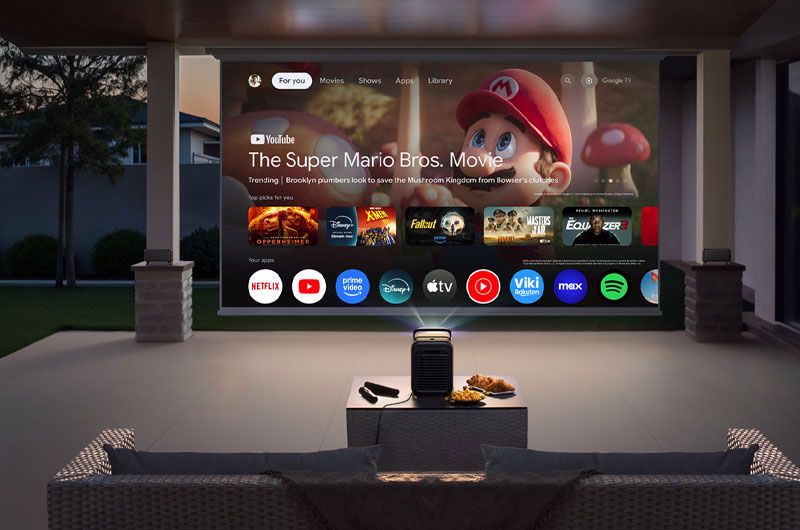
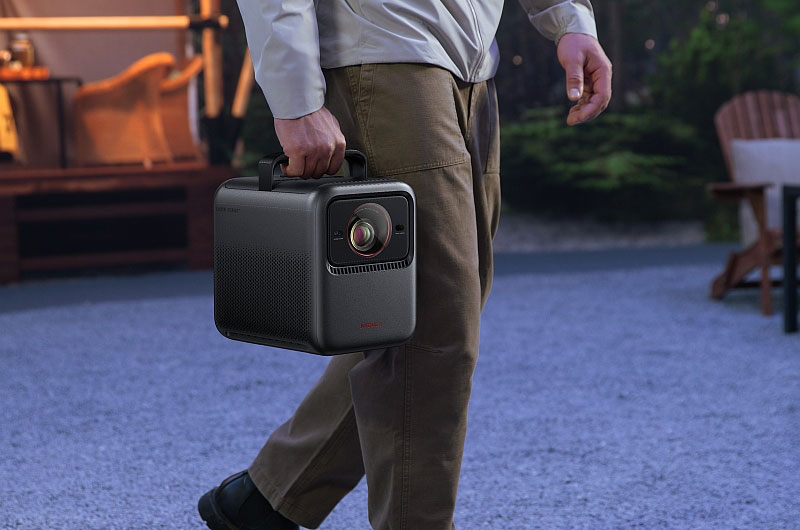
This is a substantial unit with a solid chassis, weighing 13.7 lbs and measuring 11.1 x 7.3 x 9.7 inches (WHD) with its handle retracted. Stylistically, it resembles the Cosmos 4K SE and the Cosmos Laser 4K but adds a feature that the others lack. That's the auto micro gimbal that shifts the lens and is employed for AI Spatial Adaptation, which helps with setup by automating optimization to adjust the projector's screen based on the environment that it is projecting in.
Within the Settings > Projector menu, this feature is labeled Spatial Adaptation. Utilizing its lens and an electric pan-tilt mechanism, the projector scans the environment and adjusts its internal lens optics to suit it. This creates the largest possible image for the current placement of the projector, while the lens pivots vertically using its electric tilt mechanism.
AI Spatial Adaptation works with or without a screen. With a screen, the X1 aligns the image perfectly. Without one, it scans the wall for obstacles and avoids them. Spatial Recall, also in the projector menu, allowing you to save these settings for specific rooms, which is a time-saver when moving the projector between spaces.
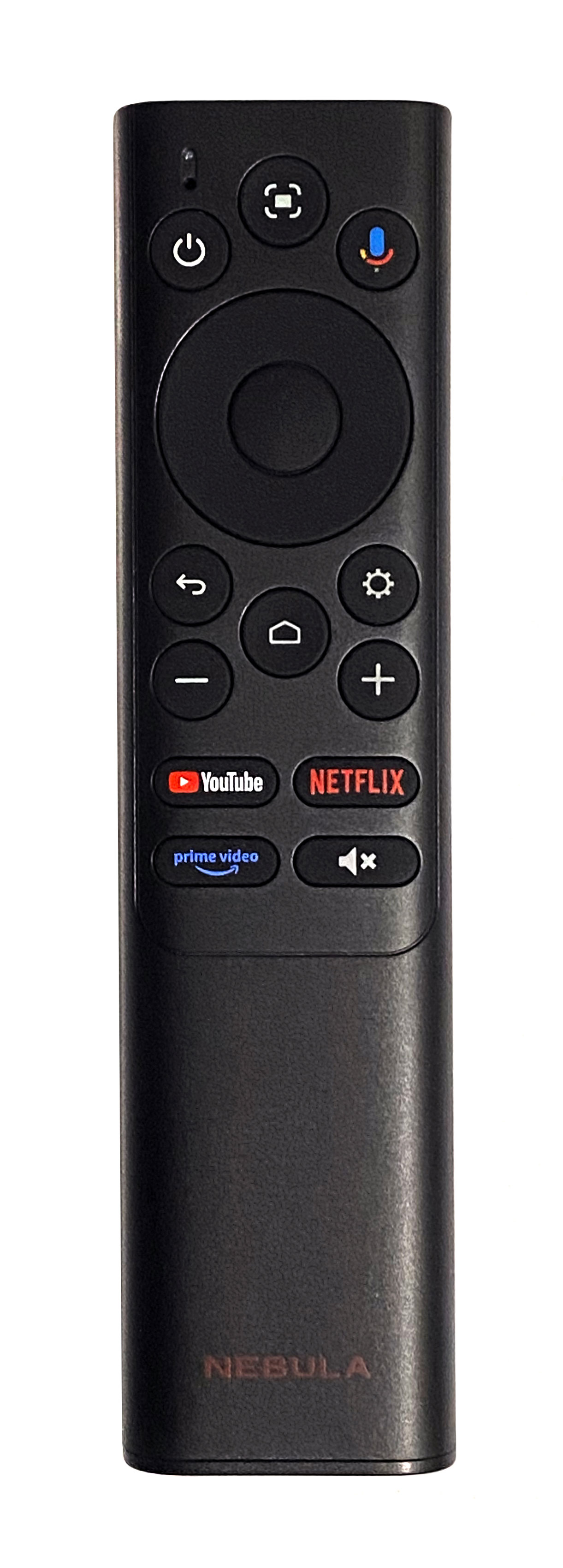
The X1 can be controlled in several ways: via its remote, touch buttons on the unit, the Nebula Connect App (iOS and Android), or through Google Voice Assistant. The remote is a matte black, standard Google TV design, with a well-laid-out, intuitive button layout. The indicator light and microphone for Google Assistant are at the top left. The top three buttons are for power, auto image adjustment, and Google Assistant. To manually adjust the image, hold the Auto button. Below that are navigation controls, followed by buttons for back, home, settings, and volume. The final four buttons offer quick access to YouTube, Netflix, Prime Video, and the mute function.
At $2,999, the Nebula X1 is positioned as a portable projector with home theater-level performance. While Anker's lower-tier models offer similar features for $1,000+ less, you won't get the same brightness, Dolby Vision, or AI enhancements. A portable projector this bright is rare in this category, and the X1 delivers impressive real-world performance in multiple ambient light settings.
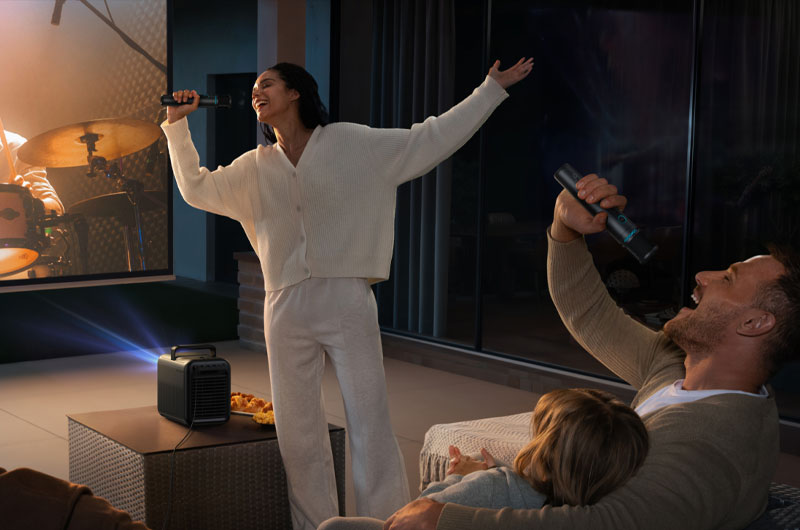
The bundle adds two wireless satellite speakers, two wireless microphones, and a rugged carrying case. Why the microphones? In a word: karaoke. Paired with the satellite speakers and main unit's speakers, the X1 becomes a portable entertainment hub—half home theater, half karaoke machine. An interesting twist, indeed. The microphones are rated for 40 hours of use.
The 4.1.2 surround sound system includes two Wi-Fi satellite speakers, which brings the whole system to a substantial 80 watts. This setup offers powerful, room-filling audio. The satellite speakers are rated for eight hours on a charge, but lasted longer than that, and feature 25 ms low latency. With IP54 water and dust resistance, the speakers are ideal for outdoor movie nights or parties. Even without the satellites, the built-in speakers easily fill a room at low volume, but audiophiles will particularly appreciate the expanded soundstage with the satellites.
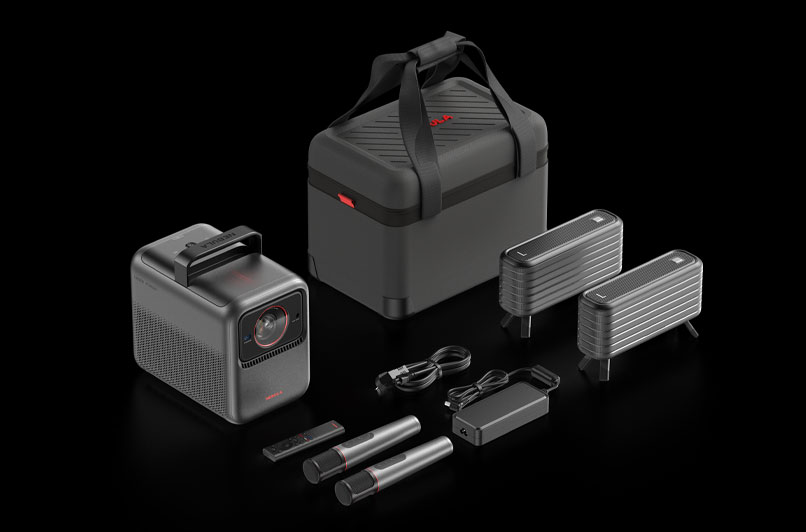
The carrying case is high quality and worth purchasing separately if you plan to travel with the X1. It's well-padded, with compartments for the projector, speakers, microphones, power brick, and cables, plus a detachable shoulder strap. If you don't plan to purchase the entire bundle, you can use those extra compartments for anything you like—Blu-ray discs, game controllers, for example, can fit inside.
The projector's smart OS is Google TV, with official Netflix licensing. Through Google TV, you can access Prime Video, Hulu, Max, Apple TV, Starz, YouTube, and more, all in 4K Dolby Vision or HDR10 when available. Google TV's interface is clean, app-rich, and intuitive to navigate. A built-in browser app also allows for light web browsing, but you have to download it through the Google Play Store.
Casting is supported through Google Cast, but there's no native AirPlay. However, the Nebula Cast app (downloadable from the Google Play Store) allows Apple device casting. Unlike apps like Replica, when you cast from YouTube, videos automatically display in proper 16:9 orientation rather than vertical.
I tested the projector by watching chess tutorials for research. For example, I streamed a video of grandmaster Magnus Carlsen analyzing a game from The Queen's Gambit between Elizabeth Harmon and Borgov. The audio was synced and sounded excellent. Some clips from the show itself had minor playback skips, but this appeared to be a content issue rather than the projector.
I also watched a video by Challenge Accepted, where host Michelle Khare trains with chess grandmasters for a tournament. She even played against Rainn Wilson and Mr. Beast. It was smooth and enjoyable with no audio sync issues, except for laggy Zoom call videos (for long-distance lessons) caused by the source content.

Anker advertises a 19 ms input lag for gaming. In its Game (Extreme) mode, it measured 18.3 ms at both 1080p and 4K. This is responsive enough for casual and even competitive gaming, though serious esports players may prefer dedicated gaming projectors with as low as 4 ms latency. Still, for gamers who prioritize video quality and 4K performance, the X1 delivers.
The Nebula X1 package includes the projector, remote (with AAA batteries), power brick and cable, Quick Start Guide, and warranty card.
Performance
Color Modes. The Anker Nebula X1 offers an impressive range of nine color modes, most of which deliver excellent color performance. These include: NebulaMaster, Standard, Vivid, Sport, Movie, Game, Conference, ISF Day, and ISF Night. The ISF modes, developed by the Imaging Science Foundation, are optimized for accurate color reproduction in bright rooms (Day) or during nighttime viewing (Night).
When HDR content is detected, all modes display "(HDR10)" after their names. For 4K Dolby Vision content, you'll see three dedicated modes: Dolby Vision Bright, Dolby Vision Dark, and Dolby Vision Vivid.
There is no Color Management System (CMS) in either ISF mode, as they have already been calibrated, but the remaining modes allow adjustments for black levels, contrast, saturation, and sharpness. You can also select your preferred color space: BT.709, Adobe RGB, BT.2020, or DCI. The X1 includes Dynamic Contrast as well. To evaluate each mode, I tested them against a color wheel with primary, secondary, and tertiary colors, each in eight shades.
NebulaMaster mode measured 2,436 lumens (SDR) and 2,397 lumens (HDR). Many colors appeared accurate, though slightly more vibrant with a faint blue cast. Oranges, however, looked somewhat desaturated.
Standard mode measured 2,588 lumens (SDR) and 2,561 lumens (HDR). Like NebulaMaster, its colors were mostly accurate but with some desaturation. This gave video content a pleasant, cinematic feel. Yellows and oranges were slightly muddy.
Vivid mode measured 2,101 lumens (SDR) and 2,099 lumens (HDR). Greens and cyans leaned toward blue, while reds were intensely vibrant. As the name suggests, the color wheel looked noticeably more vivid compared to my reference image.
Sport mode measured 2,439 lumens (SDR) and 2,448 lumens (HDR). All tones except red were close to accurate; reds appeared muted.
Movie mode measured 2,193 lumens (SDR) and 2,190 lumens (HDR). This mode has a warmer, slightly desaturated look, with oranges appearing brownish and muddy.
Game mode measured 2,472 lumens (SDR) and 2,435 lumens (HDR). A subtle blue cast runs throughout, which tends to flatter video game visuals. Aside from that, the tones remained fairly accurate.
Conference mode measured 3,187 lumens (SDR) and 3,177 lumens (HDR). The overall image skewed heavily green—a typical tradeoff in "brightest" modes that prioritize output over accuracy. Given that the X1's other modes are both bright and color-accurate enough for presentations or media playback, it is unlikely you will want to use this mode.
ISF Day mode measured 2,219 lumens (SDR) and 2,154 lumens (HDR). Ideal for daytime viewing, it offers accurate color though slightly muted saturation, which works well in bright conditions.
ISF Night mode measured 2,284 lumens (SDR) and 2,158 lumens (HDR). Designed for nighttime use, it's similar to ISF Day but with deeper tones that excel in dark rooms.
The takeaway: You don't need all nine modes. ISF Day and ISF Night are the clear winners for films and TV shows, while Game mode (with Extreme Game mode enabled) is best for gaming. The rest are more about personal preference in tone.
For testing, I used the integrated Google TV and a Sony UBP-X700 4K UHD Blu-ray player for video content, along with an Xbox and PlayStation 4 for gaming.
SDR Streaming. I started with Holes on Disney+ in Movie mode. It's from 2003, making it an older film than I typically use to test, but I had recently mentioned yellow-spotted lizards to someone, and it popped up while I was searching for another movie. So, it was the natural choice. The projector handled the color reproduction well. Skin tones appeared natural, and there was minimal highlight clipping in NebulaMaster. Switching to ISF Day reduced the clipping entirely.
The film features several slow-motion sequences that seem to have been shot at 24 fps and slowed in post-production rather than at 60 or 120 fps (which is more common today). This caused the slow motion to look slightly choppy. This isn't an issue with the projector or Disney+, but rather the way the footage was captured. Pluto TV, however, is a different story. I experienced noticeable skipping on that app, just as I did when reviewing my last Google TV projector.

Keeping with the older-film theme, I next watched The Princess Bride on Disney+. I had been discussing it with friends and felt inspired to revisit it. Despite its age, the color and clarity were excellent. It looked particularly good on the big screen in ISF Night mode. ISF Day would have been equally effective had I been watching during daylight hours.
Black Sails on Amazon Prime Video proved a bit trickier. Highlights, especially under sunlight, tended to clip. Switching to ISF Night helped somewhat, but not completely. It wasn't distracting for casual viewing, but a cinephile would notice. Aside from that, the colors were rich, and the image was sharp and detailed.
Finally, I watched Season 2, Episode 1 of The Sandman on Netflix in ISF Day. The results were stunning. Reds were especially striking, skin tones looked natural, and black levels were excellent. Some shadow detail was lost in very dark scenes, but not enough to affect the overall experience. The scene with Nada and Dream in his realm was particularly beautiful and cinematic.
4K HDR Streaming. I'm a fan of both ancient history and Pedro Pascal, so when I saw Gladiator II available on Prime Video in 4K UHD, it was my natural first choice. The opening title sequence looked spectacular, with text appearing razor-sharp. I was struck by the intricate detail in the ocean waves and the approaching Roman fleet in the opening scenes. It looked excellent in NebulaMaster (HDR10), but ISF Day (HDR10) offered deeper, richer colors and handled skin tones better, with a slightly warmer tone compared to NebulaMaster. I was particularly impressed with the deep crimson reds of the Roman capes and banners, as well as the teals and blues. The fine details of fabrics, along with the textures of wood and stone, were all rendered with exceptional clarity. This film looked best with the MEMC setting on Low or Middle.

Next up was Serenity on Prime Video, directed by Joss Whedon—an older film (2005) that I also own on 4K Blu-ray. It's one of my favorites, and the X1 did not disappoint. ISF Day provided natural skin tones and accurate colors, with textures like linen and metal appearing sharply defined. The weathering on Captain Mal's coat, for example, was clearly visible. Black level performance was excellent here, as it was with Gladiator II.
For TV, I watched Good Omens, season 2, episode 1... and then then I binged the entire season. The creation of the universe sequence was stunning, and I immediately noticed the strength of the black levels. I started in Movie (HDR10) mode but switched to ISF Day (HDR10), which I preferred. The animated opening title sequence looked crisp and colorful, with beautiful skin tones and accurate color reproduction throughout. I watched in both ambient light and fully darkened conditions, and the experience was so immersive on the big screen, making it a rather enjoyable experience.
I did find that the projector struggled slightly with very dark scenes, such as those set in Hell, when a light source was shining directly on the screen. Some types of content, such as Prime Video ads, were almost blindingly bright by comparison. Any projector will be affected by ambient light, but the X1 holds up impressively in most situations. Pairing it with an ALR or CLR screen would help maintain contrast and color in brighter rooms.
SDR Blu-ray Viewing. I watched the 4K versions first, then revisited the same films in SDR to compare the differences. I began with Jurassic World: Dominion. From the start, I noticed that the SDR image appeared brighter than its 4K Dolby Vision counterpart. This is expected, but it highlights how SDR content is generally easier to view in daylight with ambient light present. That said, I still preferred the depth and richness of 4K with Dolby Vision.
ISF Day and ISF Night both handled colors well, with natural skin tones and strong reds and blues. Black levels were very good, though shadow detail was slightly crushed in darker scenes. Snow scenes were bright but not overblown, except for minor highlights that weren't distracting. Sunlight on Ellie's white shirt looked natural and never clipped. However, the yellow-tinted scenes, such as when Ellie meets Alan to enlist his help infiltrating Biosyn's sanctuary, felt overly warm for a moment, though this resolved as the scene went on. I suspect I wouldn't have noticed if I hadn't just seen the film in Dolby Vision.

I usually avoid using MEMC, but I found that Low or Middle MEMC helped certain content appear smoother. For example, Jurassic World: Dominion had some choppiness in places, which Middle MEMC resolved. I now think Holes would have also benefited from Middle or High MEMC. While 1080p content looked sharp, the difference between it and 4K was noticeable, though still satisfying for SDR playback.
Next up was Uncharted. I was curious how its SDR version would compare to its 4K Dolby Vision release, especially in bright highlights. I watched it in ISF Day and ISF Night and was pleased to see no highlight clipping in the opening scene. It was a strong performance from this projector. This movie is my go-to for evaluating how well a projector handles bright highlights.
Colors were vibrant, with the blue of young Sam's jean jacket, young Nate's zip-up jacket, and the nun's habit standing out in particular. During the auction scene, I did see a bit of highlight clipping on the white collars of the men's dress shirts, but it wasn't significant. Most viewers likely wouldn't notice; I was watching for it specifically. While Dolby Vision still had the edge, the SDR version held its own.

Finally, I tested Big Hero 6. Even during the previews (Maleficent, Toy Story, Wall-E), colors looked excellent in ISF Day. The opening sequence, where we fly through the city to the bot fight, looked natural and well-balanced. While 4K Dolby Vision deepens colors further, the SDR version still delivered pleasing reds, blues, and skin tones.
4K Dolby Vision Blu-ray Viewing. Here, the Nebula X1's performance was absolutely stunning. The projector handled Dolby Vision content exceptionally well. In Jurassic World: Dominion, projected in Dolby Vision Bright, colors were reproduced accurately with no visible highlight clipping, even on bright snow.
In darker scenes that often trip up other projectors, the X1 maintained clear edges and excellent detail. One example was a night shot of Maisy's kidnapper watching the cabin from a truck; shadow detail was strong and black levels were deep. Skin tones and hair looked natural, while colors were rich, with blues and reds especially vibrant. Even the warmer, yellow-toned scenes stayed within a natural, balanced range. It looked great in all three Dolby Vision modes.
Next, I tested Uncharted. I began in Dolby Vision Bright, which struggled slightly: the opening scene, filled with bright whites (Nate's shirt, clouds), often causes blown highlights on other projectors. Here, highlights were managed, but colors felt slightly dim and desaturated. Not bad, but I suspected other modes might perform better.
Switching to Dolby Vision Dark significantly improved the dynamic range, making colors pop and eliminating clipped highlights. In the auction scene, there was just the slightest hint of highlight clipping, but it was minimal. Returning to Dolby Vision Bright made the image appear flat by comparison.

Black level performance in Uncharted was excellent overall, with good shadow detail and natural-looking skin tones without harsh highlight issues. Clarity and sharpness were equally impressive, making for an immersive viewing experience.
Lastly, I watched Big Hero 6 in Dolby Vision Dark, which quickly became my favorite mode. The opening sequence, as the camera glides through the city toward the bot fight, was breathtaking. Razor-sharp and bursting with stunning color. Reds stood out without feeling oversaturated, and all hues looked natural. Baymax's all-white body, which could easily suffer from highlight clipping, was perfectly even-toned with no issues. This is the best I've ever seen this film look on any projector I've reviewed.
Gaming. Input lag was measured using a Leo Bodnar 4K Lag Tester in Game (Extreme) mode. At 60Hz, both 1080p and 4K measured 18.3 ms, which is more than sufficient for most gamers. In Standard Game mode, input lag increased to 35.1 ms for both 1080p and 4K at 60Hz.
The first game I tested was Sea of Thieves on Xbox, an online multiplayer pirate adventure. My nephew and I sailed a sloop, battling a kraken, a megalodon, four storms, skeleton hordes, and rival pirates. I even got struck by lightning. Thrice. In a row. Despite all this chaos, there was no noticeable lag while using Game (HDR10) mode with the Extreme setting enabled (which disables keystone correction). Running in 4K with HDR, the visuals were stunningly crisp, detailed, and full of vibrant color. I kept commenting to him over mic about how good the game looked on the projector. Even during nighttime gameplay, visibility was excellent, and I could easily see where I was sailing.

I played with daylight streaming through my burgundy gossamer curtains, which dim the room but don't block all ambient light. The projector's brightness handled this environment well, with only minimal washout when I turned on colored lights. Bright, warm lighting caused a more effect, as mentioned earlier.
Horizon: Zero Dawn, also in 4K, showcased beautifully rich color and sharp, detailed visuals. Aloy, NPCs, the mechanical creatures, and the sweeping environments were rendered with exceptional clarity and zero highlight clipping. Gameplay was smooth, with no latency issues. The HUD colors were slightly off, but not in a way that distracted from the experience.
Next, I tested Spyro Reignited, a vibrant 3D platformer. The X1 delivered deep, saturated colors and a crisp image, particularly excelling in the game's more colorful levels. However, I did notice significant highlight clipping in the desert world on the sandy terrain. Fortunately, this was limited to that specific environment. While I wish it looked better there, most levels were unaffected, so it wasn't a dealbreaker.

										Let's Talk Projectors!
										The ProjectorCentral Forums is a great place to chat with other projector enthusiasts about all things projectors.
										Join the Discussion
Audio Quality. Wow. Just, yes. Even the integrated speakers are impressive on their own, delivering spacious, room-filling sound. In Music mode, the system shines. Using my MacBook Pro with Nebula Cast, I played my writing playlist and was thoroughly impressed. There were clear vocals, balanced treble and mids, and a surprisingly robust bass response. It sounded excellent across all genres, whether it was pop, rock, house, classical, or film scores. I even tested it with my own arrangement of Moonlight Sonata, featuring sitar, piano, and orchestral instruments. The X1 captured the sitar's resonance beautifully without muddying the sound, which is something few onboard speakers can achieve.
Adding a pair of optional 80-watt satellite speakers truly elevate the audio experience, making them a worthy upgrade for anyone seeking cinematic surround sound and more than 15 hours of continuous movie and TV playback.
Paired with the onboard speakers, the satellite speakers make films, TV shows, and games feel far more immersive. I primarily used Movie mode for this setup. If you already have a soundbar or prefer one, that's also an option, as these speakers connect via Bluetooth. For those with a full home theater system (or planning to build one), the second HDMI port supports eARC for high-quality audio passthrough.
Big Hero 6 stood out as a test case for audio performance. The bass rumble during action scenes was deep and theater-like, creating a true cinematic feel. These speakers effectively transform the X1 into a portable home theater system, and they're well worth it.
Conclusion
I love this projector. Anker truly outdid themselves with the Nebula X1. I thoroughly enjoyed reviewing it, and I can confidently say I'd 100 percent purchase this for myself. As a bright-room projector, it performs admirably. Though very dark scenes can struggle under direct lighting, this is easily remedied with an ALR or CLR screen, depending on your setup.
The onboard sound is outstanding for a portable projector, and when paired with the satellite speakers, it transforms into a mini home theater system that's both powerful and immersive. Combine that with its sharp 4K resolution, Dolby Vision support, 3,500 lumens of brightness, and excellent color accuracy, and the X1 is one of the most impressive portable projectors I've tested.
Is it expensive? Yes. Is it worth it? Absolutely, if you want a premium, all-in-one projector that can handle movies, games, and even karaoke with ease. For anyone looking for a portable 4K powerhouse that rivals some dedicated home theater projectors, the Nebula X1 is not one to be overlooked.

Measurements
Brightness. Anker rates the Nebula X1 for 3,500 ANSI lumens. In our 9-sector average measurement in Conference picture mode at 100% brightness in a fully darkened room, the X1 measured 3,187 lumens in SDR and 3,177 in HDR. Standard picture mode is the brightest mode with good color, measuring 2,588 lumens in SDR and 2,561 in HDR.
That's only 9% below claim. Up to 25% below claim is considered acceptable. Visually, however, this is an exceptionally bright projector, with no modes that couldn't stand up to a lot of ambient light, whether coming from lamps or daylight through the window.
This could be used outside during the day, but best results would occur with the screen being covered under an awning or something that provides shade, rather than direct sunlight. It doesn't have a built-in battery, so you'd need to stick close to power anyway.
Anker Nebula X1 ANSI Lumens
| SDR | 100% Brightness/Max Iris |
|---|---|
| NebulaMaster | 2,436 |
| Standard | 2,588 |
| Vivid | 2,101 |
| Sport | 2,439 |
| Movie | 2,193 |
| Game | 2,472 |
| Conference | 3,187 |
| ISF Day | 2,219 |
| ISF Night | 2,284 |
| HDR | 100% Brightness/Max Iris |
| NebulaMaster (HDR) | 2,397 |
| Standard (HDR) | 2,561 |
| Vivid (HDR) | 2,099 |
| Sport (HDR) | 2,448 |
| Movie (HDR) | 2,190 |
| Game (HDR) | 2,435 |
| Conference (HDR) | 3,177 |
| ISF Day (HDR) | 2,154 |
| ISF Night (HDR) | 2,158 |
Zoom Lens Light Loss. The X1 has a fixed focal length, so there is no light loss.
Brightness Uniformity. The Nebula X1 has outstanding brightness uniformity, with 95.6% in HDR and 90% in SDR. In HDR, the brightest sector of the screen was the top center and the dimmest was the bottom right. In SDR, the brightest sector of the screen was the left center and the dimmest was the top right. There were no visually detectable hotspots or dimming. There is only the slightest amount of laser speckle, and I had to get a couple inches from the screen to see it. It is unlikely that you will detect it during viewing at all.
Fan Noise. Anker claims 26 dBa for the X1's fan noise in a lab setting. My testing room's noise floor is 32.1 dBA, which is higher than the conditions you would get in a controlled lab environment. Measuring the X1 at approximately three feet away from multiple locations the audible noise measured between 32.4 and 34.8 dBA. The brightness of the laser is controlled via the Picture menu and can be adjusted from 0% to 100%. I measured the fan noise at 100% brightness.
Normal
Left - 33.1 dBA
Right - 32.6 dBA
Front - 33.1 dBA
Rear - 34.8 dBA
Input Lag. Anker rates the latency at 19 ms. Input lag was measured using a Leo Bodnar 4K Lag Tester in Game picture mode with Extreme mode activated and with it deactivated (called Standard).
Extreme Mode On
1080p @ 60Hz = 18.3 ms
4K @ 60Hz = 18.3 ms
Standard Mode On
1080p @ 60Hz = 35.1 ms
4K @ 60Hz = 35.1 ms
Connections
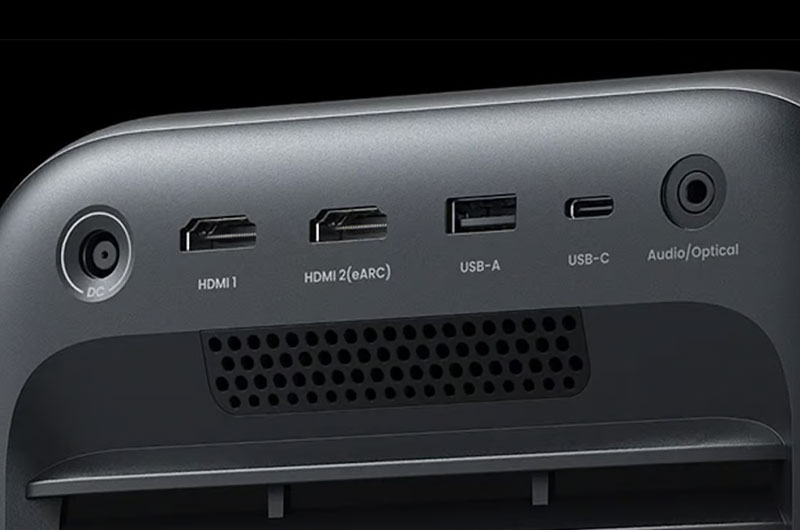
- HDMI
- HDMI (eARC)
- USB Type-A
- USB Type-C
- Audio Optical Out
- DC-In (Power)
For more detailed specifications and connections, check out our Anker Nebula X1 projector page.
To buy this projector, use Where to Buy online, or get a price quote by email direct from Projector Central authorized dealers using our E-Z Quote tool.


Post a comment